
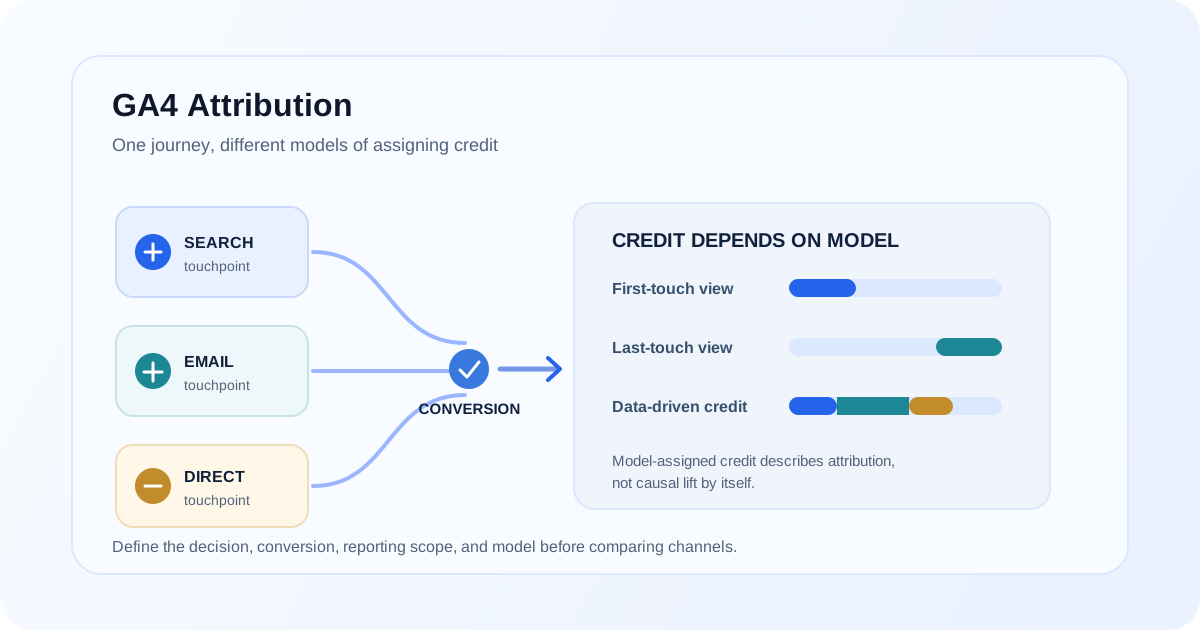
Attribution reports can make a channel look like the answer to a simple question: “Which marketing source drove this conversion?” In practice, the report assigns credit according to a model, reporting scope, and the touchpoint data available to GA4. It is not, by itself, proof that a channel caused the outcome.
To use GA4 attribution well, first define the decision you are trying to make. Are you comparing channel credit for a particular conversion? Reviewing paths before a key event? Evaluating acquisition sources? Different questions call for different reports and may produce different views of the same journey.
What attribution measures—and what it does not
Attribution is a method for assigning credit to eligible interactions associated with a conversion. GA4 provides attribution settings and reports for supported events and channels. The selected reporting model affects how credit is distributed; available observations may also be limited by data availability, consent choices, and the measurement setup.
Attribution does not turn observed associations into a controlled experiment. A report can help describe how credit is assigned under its rules, but it does not prove what would have happened without a channel. For incremental impact, use an appropriate testing or causal measurement design in addition to descriptive attribution.
Model, scope, and question
| What to define | Why it matters | Practical check |
|---|---|---|
| Conversion | Different actions represent different outcomes | Confirm the key event and its firing definition |
| Scope | User, session, and event dimensions can describe different contexts | Read the report's dimension and metric definitions |
| Attribution model | Models distribute credit using different rules | Note the model applied to the report or conversion setting |
| Lookback window | Eligible touchpoints depend on the configured period and report | Confirm the relevant window in the current GA4 settings |
| Channel data | Incomplete or inconsistent tagging affects classification | Review UTMs, redirects, referrers, and cross-domain journeys |
| Decision | A descriptive report is not automatically a budget test | State what action the analysis will inform |
Avoid comparing numbers from different scopes as though they were the same metric. Before exporting data, record the property, date range, conversion, attribution model, dimensions, and filters.
Understanding data-driven attribution
Data-driven attribution in GA4 distributes conversion credit across eligible interactions using observed data and the platform's model. It is not equivalent to last-click, first-touch, or a manually selected fixed weighting. Its output should be interpreted as model-assigned credit within GA4's reporting context.
The result depends on the conversion, available eligible interactions, reporting settings, and the data GA4 can use. It does not mean that every journey has a perfectly observed set of touchpoints or that the credited channel would independently have produced the conversion.
When using data-driven attribution:
- Confirm which conversion/key event and property are in scope.
- Check the current attribution settings and report model rather than assuming a default.
- Compare like-for-like periods and dimensions.
- Explain that credited conversions or value represent model allocation, not a causal lift estimate.
- Pair the report with experiments or other evidence when the decision requires causal impact.
First-touch, last-touch, and multi-touch questions
A first-touch view asks which observed source introduced or first reached a user under the chosen scope and identity handling. A last-touch view asks which eligible interaction receives credit closest to the conversion under that model. Data-driven attribution can distribute credit across interactions rather than selecting only one.
These models are not interchangeable summaries. First-touch can help describe acquisition, while last-touch can describe the final credited interaction; neither necessarily describes all influence. GA4's available reports and model options can change, so verify the current settings rather than assuming every report offers every model or dimension.
For example, a user may arrive through a non-brand campaign, return later from an email, and then convert through a direct visit. A model or report that emphasizes one touchpoint answers a different question from one that distributes credit across several. Keep the campaign tagging and conversion definition consistent so these comparisons remain interpretable.
Build a useful attribution review
Use this sequence when reviewing channel performance:
- Name the decision. State whether the review informs acquisition, channel optimization, campaign diagnosis, or a test.
- Select the outcome. Define the conversion event and check whether its firing behavior matches the intended business action.
- Set the analysis scope. Choose the property, date range, dimensions, filters, and applicable attribution model.
- Validate channel inputs. Check campaign parameters, redirects, referral exclusions, and cross-domain behavior where relevant.
- Compare consistent views. If comparing models, hold conversion, period, dimensions, and filters constant.
- Review paths and limitations. Look at available journey context, while noting missing or unobservable touchpoints.
- Separate credit from causality. Treat report output as model-based allocation, not proof of incremental effect.
- Document the interpretation. Record assumptions and the decision the report can reasonably support.
If your GA4 and CRM source reports disagree, align their attribution definitions before reconciling lead counts; the GA4 and CRM lead comparison guide explains why systems may use different touchpoint fields. For a comparison of tracked website interactions and CRM lead records, see why GA4 conversion numbers don't match CRM leads.
Attribution quality depends on implementation
Attribution analysis is only as useful as the underlying event and campaign data. Check that key events represent completed actions rather than clicks that may fail. Use consistent campaign tagging, preserve parameters through redirects where appropriate, and verify cross-domain journeys when users move between domains.
Consent choices and blockers may limit the analytics data collected for some visits. Do not assume that missing observed touchpoints mean no marketing contact occurred. Review consent behavior and property settings under the applicable requirements.
For implementation questions, see the marketing attribution service, the GA4 tracking audit guide, and the GA4 setup service. If events are not arriving as expected, use the GA4 event debugging guide.
FAQ
What attribution model does GA4 use?
The model depends on the property and report context, and settings or available options can change. Check the current attribution settings and the report's model rather than assuming one model applies to every view.
What is data-driven attribution in GA4?
It is a model that distributes conversion credit across eligible interactions using observed data. Its credit allocation is not the same as a controlled estimate of incremental or causal impact.
Is last-click attribution always the most accurate?
No single model is universally the most accurate for every question. Last-click emphasizes a final eligible interaction; other models answer different questions. Choose and explain the model that fits the decision.
Why do GA4 attribution reports disagree?
Reports can differ in attribution model, scope, dimension, conversion, date range, filters, or available touchpoint data. Compare their definitions and settings before interpreting the gap.
Does GA4 attribution prove a channel caused a conversion?
No. Attribution allocates credit under a model to observed eligible interactions. Causal or incremental impact requires an appropriate experimental or causal analysis design.
How should I compare GA4 attribution with CRM attribution?
Define the conversion and CRM outcome, compare the same period and source question, and document each system's attribution fields and models. CRM fields may store a different touchpoint or may be overwritten, so they may not match GA4's model-based credit.
Final takeaway
Use GA4 attribution to answer a clearly stated question about model-assigned conversion credit. Keep the conversion, scope, model, and period visible, validate campaign and event inputs, and do not present allocated credit as proof of causation.
Need an attribution approach your team can explain?
A GA4 audit can review conversion definitions, channel data, and reporting assumptions so attribution comparisons answer the intended business question.