
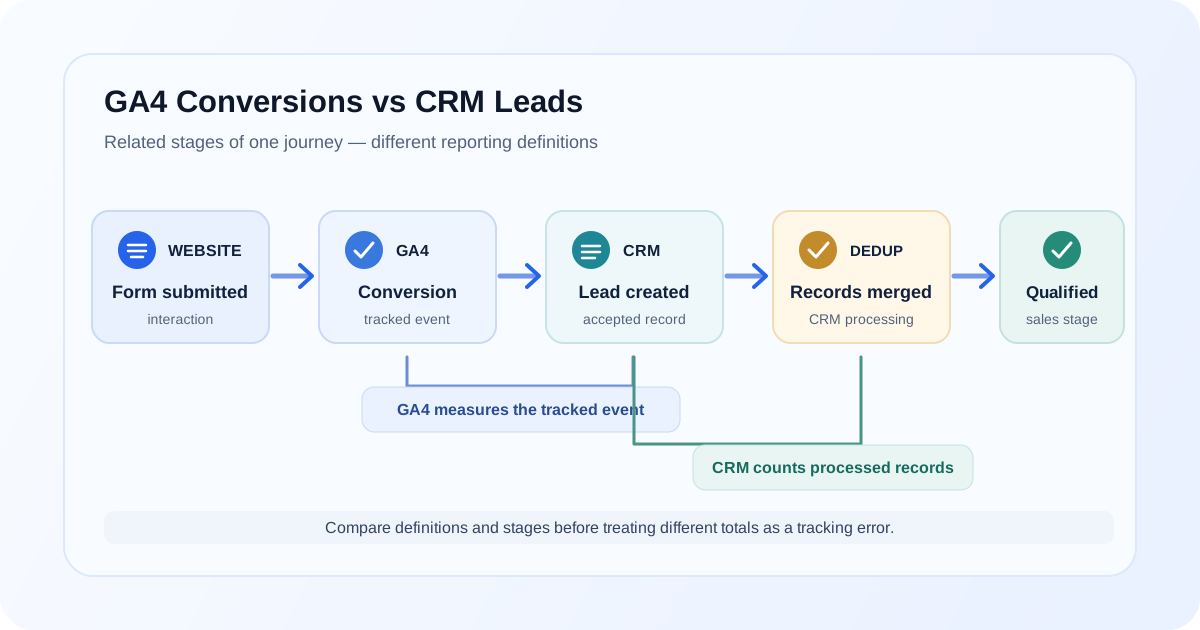
Comparing GA4 conversions with CRM leads is useful, but the two numbers do not necessarily describe the same thing. GA4 records activity that your website or app sends as analytics events. A CRM records leads according to its own intake, validation, deduplication, and sales processes.
That means a mismatch does not automatically mean tracking is broken. A form interaction may be recorded in GA4 but rejected by the CRM; a sales representative may add a lead directly to the CRM without a website visit. The first step is to define exactly what each number represents and then trace records through the lead journey.
GA4 conversion vs CRM lead
A GA4 conversion is an event your team has configured as a conversion (key event) for reporting. It might represent a form submission, a confirmation-page view, or a data-layer event sent after a form succeeds. What it counts depends on the event definition and implementation.
A CRM lead is a record the CRM creates or accepts. It may be created after form validation, enrichment, spam screening, deduplication, or manual review. Different organizations also use “lead” to mean different CRM stages, so confirm which status or record type is included in the report.
These measures can be compared, but only after their definitions and time windows are clear. A conversion event measures a tracked interaction; a CRM lead measures a record processed under CRM rules. Neither number alone necessarily describes qualified demand or business outcomes.
Common reasons the numbers don't match
Several parts of the journey can create a difference between GA4 and CRM counts:
- Duplicate form submissions: A user submits more than once, a success handler runs twice, or the form and thank-you page each trigger a conversion.
- Failed or invalid submissions: A tag may fire on a submit-button click rather than successful acceptance. Client-side validation, server-side validation, or a network error may later prevent the CRM from creating a lead.
- Spam leads: GA4 can record a successfully submitted form interaction before a CRM or downstream process identifies the record as spam.
- CRM deduplication: The CRM may merge a new submission into an existing contact or lead. GA4 may count each tracked submission while the CRM report counts unique records.
- Offline or manually entered leads: Phone enquiries, referrals, events, imports, and sales-entered records can appear in the CRM without a website conversion event.
- Consent choices and tracking blockers: Depending on the consent implementation, browser settings, and blockers, a form may reach the CRM while an analytics request is not sent or is limited. Review the behavior and applicable privacy requirements rather than assuming every missing event has the same cause.
- Cross-domain issues: A form or booking flow on another domain may lose session continuity or have a separate analytics setup. The CRM can still receive the submission even when GA4 attribution is incomplete.
- Form redirects: A fast redirect, embedded form, or third-party confirmation flow can interrupt client-side tracking or cause a separate page-view trigger to fire in addition to the form event.
- Attribution differences: GA4 and the CRM may assign a lead to different sources because they use different identifiers, touchpoint history, models, or attribution rules.
- Date and time-zone differences: GA4 and the CRM can use different reporting time zones, and they may group records by interaction, creation, or processing time.
Treat these as possible causes to test, not assumptions. Start with a few records and find the first point where the GA4 and CRM journeys differ.
GA4 can count an interaction the CRM doesn't accept
Imagine a form conversion tag fires when someone clicks Submit. The browser sends a GA4 event, but the form then fails server-side validation because a required field is missing or the CRM rejects the request. GA4 has recorded the configured interaction; the CRM has no accepted lead.
Another variation is a form that accepts the submission but later classifies it as spam. The GA4 event can be valid evidence that the form was submitted, while the CRM's clean-lead report excludes the record.
To distinguish these cases, compare the conversion's firing condition with the form's actual success response and CRM record creation. A button click is not necessarily a successful submission. If the event definition should represent accepted submissions, trigger it from a confirmed success state and test the failure path too.
CRM can contain leads GA4 never recorded
The CRM can contain legitimate records that have no matching GA4 conversion. Examples include:
- A salesperson enters a lead after a phone call or meeting.
- A record is imported from a spreadsheet, partner, event, or another system.
- Analytics consent was not granted, or a browser or network blocker prevented the analytics request.
- A form was completed on a separate domain or embedded system whose analytics tracking was not connected to the intended GA4 property.
- The tag did not fire because of a trigger, script, navigation, or implementation issue.
Check the CRM record's creation method and available source details before treating an unmatched record as missing web tracking. Phone or manually entered leads may have a useful CRM source even though no browser event exists.
Attribution is another source of disagreement
Counting how many lead records exist is different from deciding which marketing source receives credit for them. GA4 attributes website events using the available analytics data and the selected reporting attribution settings. A CRM might store the first known campaign, the latest touch captured by its forms, manually assigned source values, or a model applied later to multiple touchpoints.
These approaches can answer different questions. One report might describe the source that first introduced a person; another might describe the last tracked interaction before the form; a platform's configured model may distribute credit across touchpoints. If the CRM stores only one source field or overwrites it, it may not preserve the touch history GA4 uses.
Before comparing source/medium or campaign reports, agree on the attribution question, window, scope, and model. Compare like with like where possible, and keep the raw lead count separate from attributed-credit totals. Do not assume a source mismatch means either platform lost the lead.
How to reconcile GA4 and CRM data
Start by agreeing on the event and record definitions:
- Define the GA4 conversion: Which event counts, and does it fire on a click, client-side success, server-confirmed acceptance, or confirmation page?
- Define the CRM lead: Which record type and statuses are included? Are spam, merged records, test submissions, and duplicates counted?
- Use the same time period: Compare the same dates and check each system's time zone and whether the date refers to form submission, event collection, CRM creation, or qualification.
- Compare unique IDs where available: If a non-sensitive submission or lead identifier is safely and appropriately available in both systems, use it to match records. Do not send names, email addresses, phone numbers, or other personal information to GA4 for reconciliation.
- Check duplicate handling: Determine whether repeated form submissions create multiple GA4 events, merge into one CRM record, or both.
- Segment by source carefully: Separate online forms from phone, manual, imported, or partner-entered leads. Confirm which attribution definitions and source fields are being compared.
- Investigate examples, not just totals: Trace matched, unmatched, rejected, and merged records through the form, analytics event, CRM, and reporting logic.
- Escalate material unexplained gaps: If definitions are aligned and a meaningful pattern remains, inspect consent behavior, redirects, cross-domain journeys, tag firing, and CRM integrations.
Where a common lead identifier is not available or cannot be used safely, compare carefully scoped aggregate groups and document the limitations. Avoid adding personal information to analytics as a shortcut.
Practical reconciliation workflow
Use the lead journey as a sequence of distinct measurement stages:
Website/Form
     ↓
GA4 conversion event
     ↓
CRM lead record
     ↓
CRM deduplication
     ↓
Qualified lead
For a controlled test, record what happens at each stage:
- Submit an approved test form and note whether the website shows a success state.
- Use GTM Preview and GA4 DebugView to confirm whether the intended event fires once, with the expected name and without personal information.
- Verify whether the form request reaches the CRM and whether a record is created or rejected.
- Check if CRM deduplication merges the test submission with an existing record.
- If the lead is qualified, confirm which CRM stage or status the qualified-lead report uses.
- Compare timestamps and source fields using the definitions and time zone agreed for the analysis.
For live data, repeat the same trace with a small set of appropriately governed records. Document where the journey ends and whether the difference reflects expected processing or an implementation defect.
Diagnostic table
| What you observe | Possible explanation | What to check next |
|---|---|---|
| More GA4 conversions than CRM leads | Click-based trigger, failed submission, spam filtering, or CRM merges | Compare the event condition with form success and CRM rejection/deduplication records |
| More CRM leads than GA4 conversions | Phone/manual/imported records, consent, blockers, or missing tags | Segment by creation method and inspect web-submission records |
| GA4 and CRM counts align but sources differ | Different attribution models, stored touchpoints, or overwritten CRM fields | Compare the same attribution question, window, model, and source-field rules |
| Differences cluster near midnight | Different time zones or date definitions | Compare timestamps in a common time zone and distinguish event time from CRM creation time |
| One successful submission produces multiple events | Duplicate listeners, overlapping GTM tags, or redirect/page-view tracking | Trace one submission through dataLayer, Preview, and Network |
| GA4 records submission but CRM has no record | Request failure, invalid data, or downstream integration issue | Check the form response, server/CRM integration outcome, and error handling |
| CRM has a record but no matching web event | Offline entry, blocked request, or separate-domain tracking | Check record origin and, for web leads, inspect consent and analytics collection |
No one row proves a cause. Confirm it against the actual form behavior and record lifecycle before changing the measurement.
What should your reporting actually measure?
Lead reporting is clearer when each metric names a distinct stage:
- GA4 conversion: A configured analytics event representing a defined website or app action.
- CRM lead: A CRM record accepted under the organization's lead-creation rules.
- Qualified lead: A lead that meets the team's qualification criteria.
- Opportunity: A CRM sales record representing a potential deal under the team's process.
- Revenue: Recorded business value under an agreed revenue definition and source of truth.
These metrics are related, but they are not interchangeable. GA4 is useful for analyzing measured website behavior and attribution under its settings. The CRM is usually used to manage lead records and sales stages. Revenue reporting may depend on CRM, finance, or ecommerce systems. Choose the metric that answers the business question, state its definition, and avoid presenting one stage as a universal replacement for the others.
If you need a measurement plan for event names and context fields, see GA4 events vs parameters. For a different kind of system-to-system reporting gap, why GA4 and an ecommerce platform can show different revenue explains how to investigate revenue comparisons.
When to audit the implementation
A focused check may be enough when one form event has an incorrect trigger or a report uses a different date range. Consider a broader review when several forms or domains are involved, events are duplicated, consent behavior is unclear, attribution fields disagree across systems, or CRM processing rules make the reporting definitions ambiguous.
A GA4 audit can review the property, event definitions, and reporting assumptions together. The conversion tracking service can help assess how conversion actions are defined and validated, while the Google Tag Manager service can review triggers, variables, and tag firing. For a measurement foundation or new property, see the GA4 setup service.
If a form event is missing, use the GA4 events not showing debugging guide to trace it through the browser and GA4. For leads becoming confused with repeat records across systems, GA4 duplicate purchase events illustrates why duplicate handling and transaction-level evidence matter in ecommerce; lead records have their own CRM rules and should be evaluated separately.
FAQ
Why don't my GA4 conversions match CRM leads?
GA4 and a CRM may count different stages: GA4 records a configured event, while the CRM creates, filters, merges, or qualifies records. Differences can also come from offline leads, consent, tracking issues, date ranges, time zones, or attribution. Align definitions before comparing totals.
Should GA4 conversions match CRM leads exactly?
Not necessarily. Exact agreement is only a reasonable expectation if both systems use aligned definitions, scope, date handling, and comparable records, and if the implementation and data transfer capture the same population. Document expected differences rather than assuming all counts should match.
Why does GA4 show more leads than my CRM?
GA4 may count a click or submission attempt that fails validation, is rejected, marked as spam, or merged by CRM deduplication. Check the event's firing condition and trace a few submissions through form success and CRM processing.
Why does my CRM show more leads than GA4?
The CRM may include phone, manually entered, imported, or partner leads without a website event. Website submissions may also be unmeasured because of consent choices, blockers, cross-domain setup, redirects, or tag issues. Segment records by origin before diagnosing tracking.
Can consent mode cause GA4 and CRM lead differences?
Consent choices and the site's consent implementation can affect analytics collection, while the CRM may still receive a form submission. The effect depends on the implementation and user choices; review the actual consent states and requests, and follow applicable privacy requirements rather than assuming all consent setups behave identically.
How can I reconcile GA4 and CRM lead data?
Define which event and CRM record count, compare the same date range and time zone, review duplicate handling, and match records by a suitable non-sensitive identifier where safely available. Then segment by lead source and trace unmatched examples through the form, analytics, and CRM.
Final takeaway
GA4 conversions and CRM leads are measurements of different stages unless your definitions deliberately align them. Establish what each system counts, compare the same period and population, and trace sample records through the form, analytics event, CRM processing, and qualification. That process separates expected measurement differences from genuine tracking or integration problems.
Need to reconcile your lead measurement?
A GA4 audit can review form tracking, GTM behavior, attribution assumptions, and how analytics events map to CRM lead stages.